Stardew Valley has emerged as a prominent title in the gaming world, especially as one of the most popular farming simulator titles out there. With its charming pixel art style and diverse activities ranging from farming to fishing, the game has garnered a loyal fan base (myself included).
In this case study (my very first case study), we will explore the user experience elements of Stardew Valley, delving into how its design choices contribute to player engagement and enjoyment!
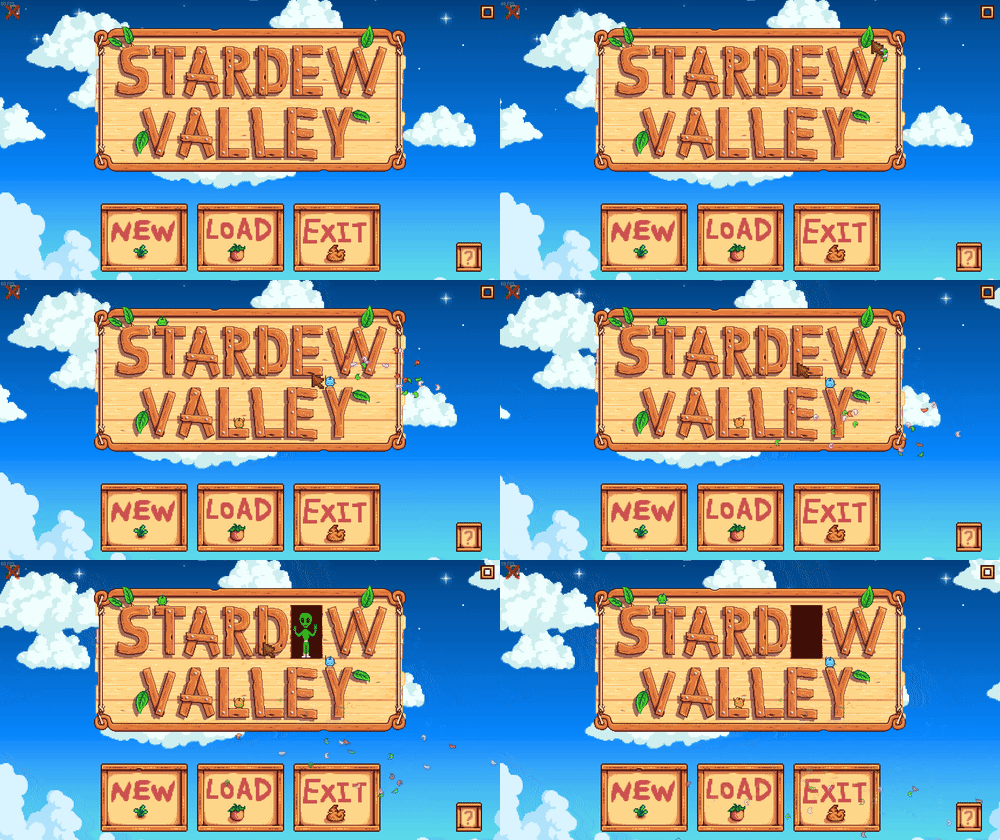
Stardew Valley Title Screen
Introduction
By diverting from the usual UI patterns of other common social simulation or casual games, Stardew Valley prioritizes **immers**ion and community interaction, offering a gaming experience that diverges from the norm.
Analyzing the Current UI — Spoilers Ahead
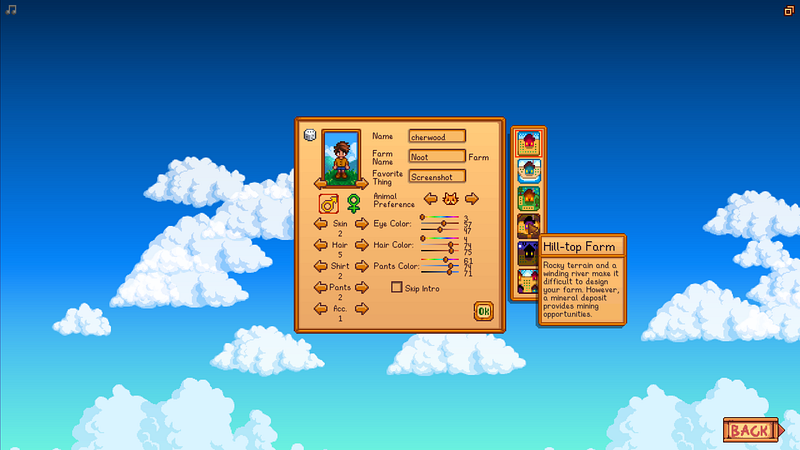
Stardew Valley Character Creation Screen
Menu Screen UIs — The UI of Stardew Valley’s character creation screen resembles a form or personal diary. There are other examples of this, like the check marks for gifted villagers and the filled out heart UI. Players are prompted to enter their favorite thing and animal preference without context. This design choice aims to maintain player curiosity and avoid spoilers. The “favorite thing” input is part of the dialogues after consuming a Stardrop. While players receive a pet a few days later, the character creation screen still inquires about their animal preference. Interestingly, Concerned Ape doesn’t do this for the option of getting a Fruit Bat Cave or Mushroom Cave, which also becomes a choice later in the game. This is probably because it’s a bit odd in a form.
Player Journey, Prototype, and Flowchart
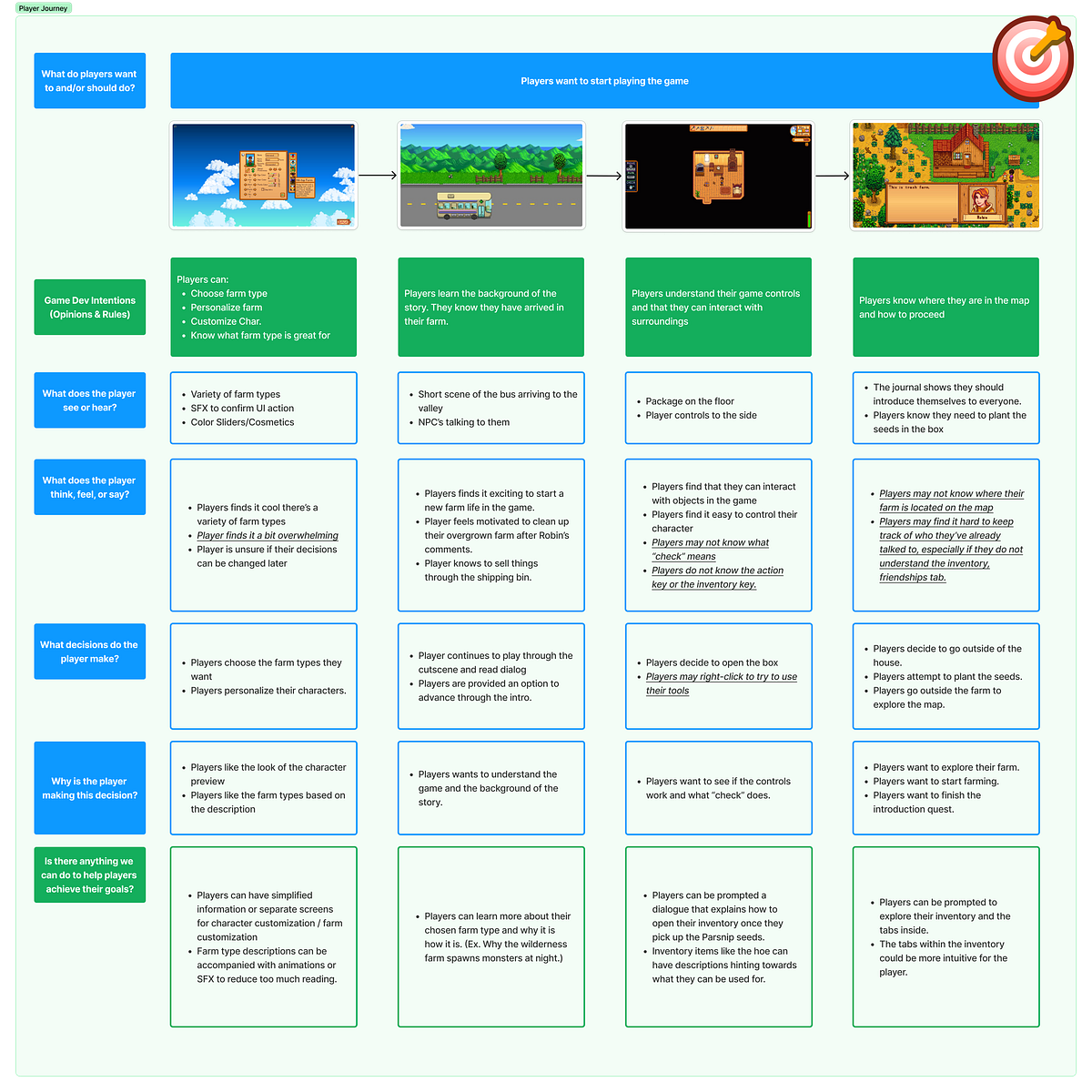
Stardew Valley Player Journey
This is my player journey analysis on the start of the game. Here are my findings summarized.
-
Players want to start playing the game as quickly as possible. They want to understand the game controls and their goals.
-
The game introduces players to the world by having them choose a farm type and customize their character. They are then shown a cut scene arriving at their farm.
-
Players may find it overwhelming at first. There is a lot of information to take in. They may not know what some of the icons or menus mean.
The game can help players by providing more information and clearer instructions. For example, the game could explain what the “check” function does or how to use the inventory.
Overall, the findings from this player journey suggest that the game is engaging and has a lot of potential. However, it could be improved by providing more information and clearer instructions to new players.
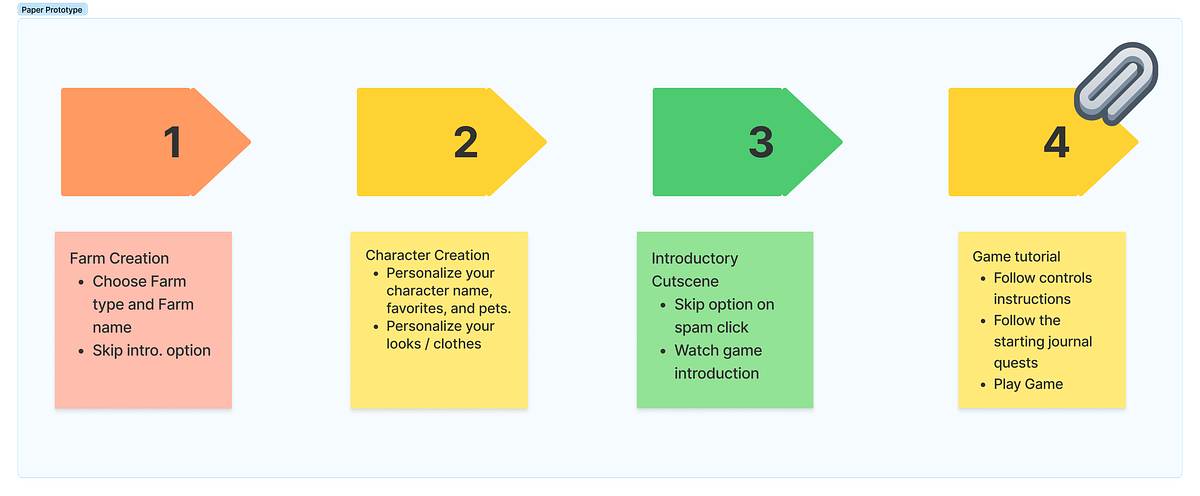
Stardew Valley Paper Prototype
These are my starting ideas when looking at the opportunities for improvement and the overall player journey. It follows a similar structure to the already implemented UI, with a few changes here and there.
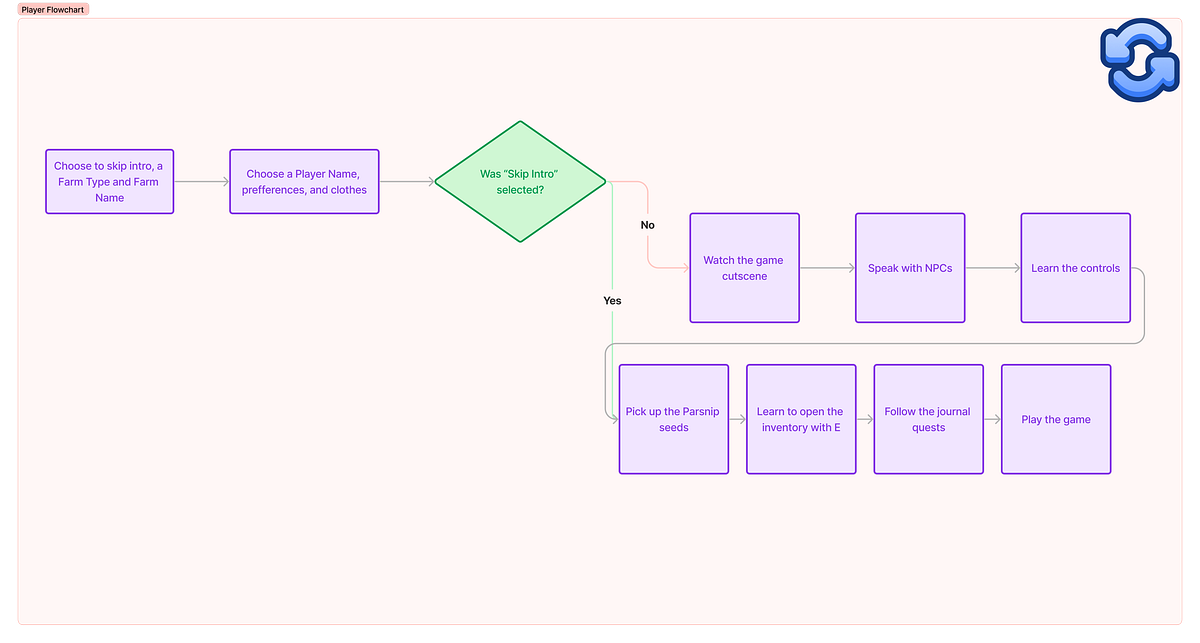
Stardew Valley Player Flowchart
This flowchart is what the players should be going through as they create their save. The Farm Creation screen and Character Creation screen are now two separate screens instead of packing them into one place. I found the arrows difficult to use for cosmetics as it was hard to remember a clothing item number after I’ve passed it to look at others, so the screens are now separate to give more room for cosmetics. Moreover, it made sense in my head that players would learn how to open their inventory after they had something new to pick up or view. Similar to how players will get a dialogue when they first get a geode, players will get a dialogue when opening their parsnip parcel that instructs them how to use their inventory (pressing E).

Geode Dialogue
Wireframing Process
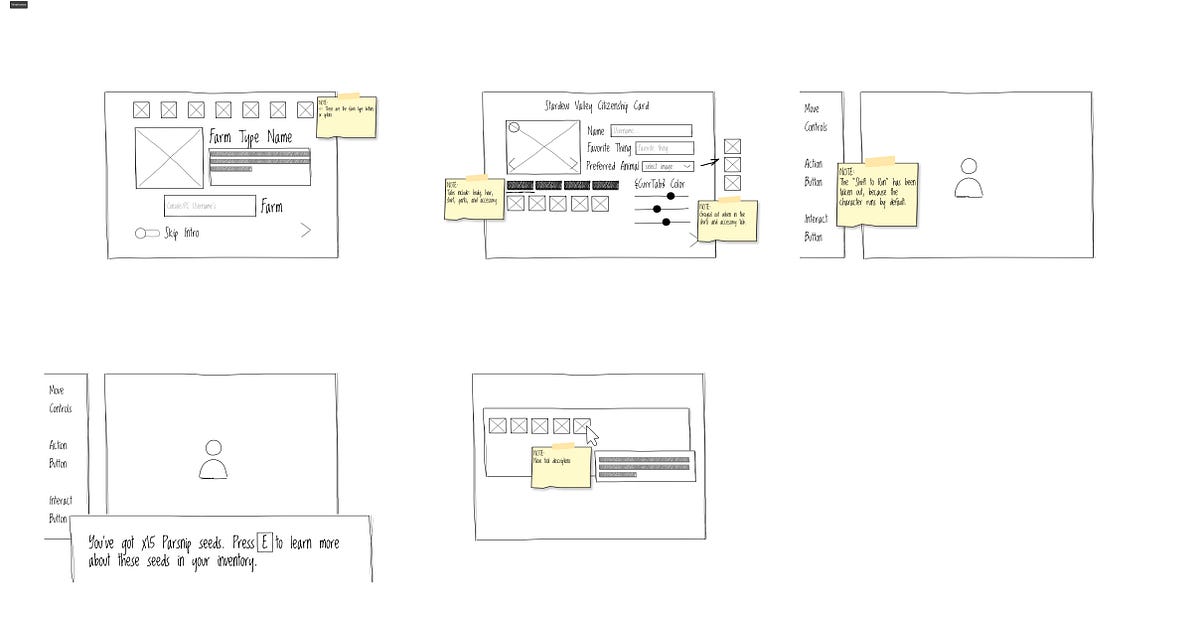
Stardew Valley Wireframes
These wireframes showcase my ideas implemented into the game. Notice that the cosmetics are now shown in an inventory-like manner so that players can view the cosmetics they have on instead of just a number. There are also notes on new dialogue and descriptions. Finally, the farm creation screen shows less condensed text on each farm type, to make it easier to read for the player.
Here are some of the questions going through my head as I made these:
-
Are the controls intuitive enough for the player?
-
Is the player given enough information to fulfill a full day in-game without looking anything up?
-
How does the player feel when starting the game? Are they overwhelmed, excited, a mix of both? Why?
-
How can I streamline the save creation process to be more intuitive and friendly?
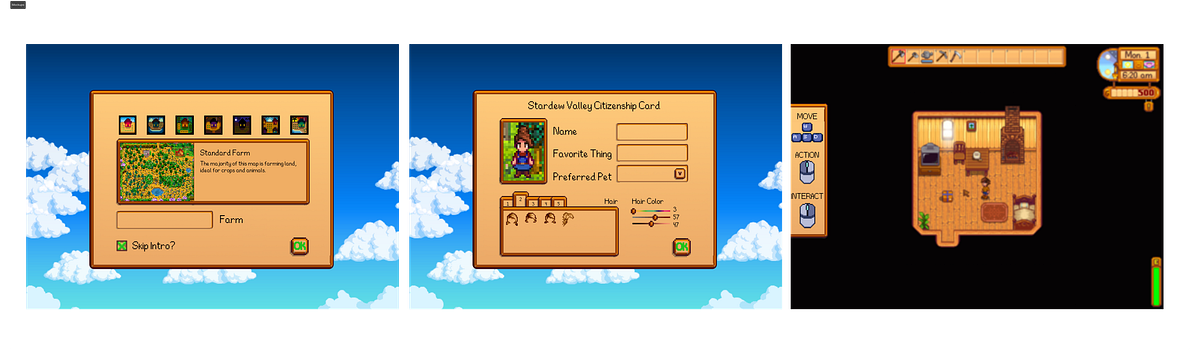
Stardew Valley Mockups
Mockup Process
Finally, with everything implemented, this is how my mockup looked. I used a lot of the current UI in game, just moved them around a bit. I made sure to stay true to the original color palette, window style, and general theme of the original game.
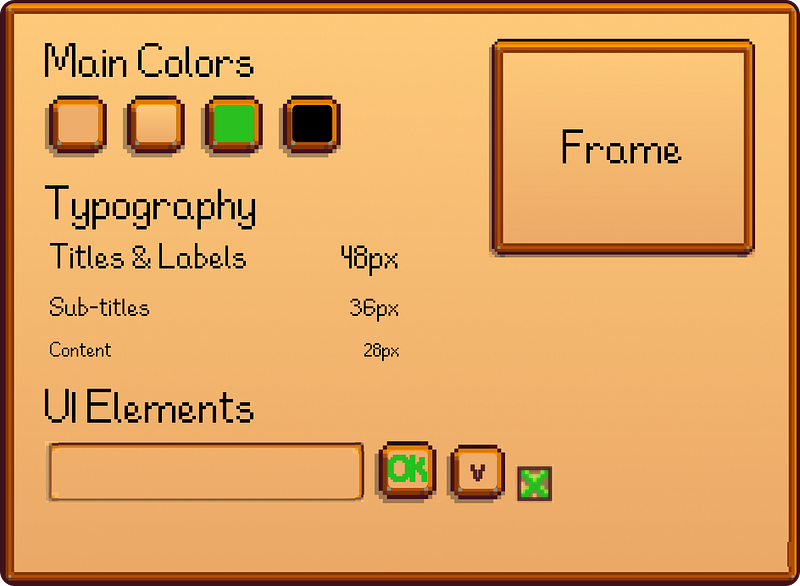
Stardew Valley Case Study Style Guide
The few differences make it easier for players to customize their character and learn more about the farm they are choosing. It also doesn’t condense the information like the original UI had done, making it less overwhelming for new players. Finally, I replaced the “Shift to Run” instruction for controls because players automatically run in the game. Instead, I replaced it with the controls for the action button, as there is a difference in-game between interacting with objects and using your tools. This will make it easier for the player to plant their first seeds.
Stardew Valley — UI/UX Case Study (Catherine Laserna)
Conclusion
Stardew Valley’s user experience design prioritizes immersion and community interaction, offering a unique gaming experience. By analyzing the player journey and suggesting improvements through prototypes and mockups, the game aims to enhance player engagement and enjoyment. With a mix of excitement and clarity, Stardew Valley continues to captivate both new and loyal players with its charming pixel art style! :)